Home
Convergence Software
How to Apply for a Scholarship
- 2026-09-01 09:03
How to Apply for a Scholarship
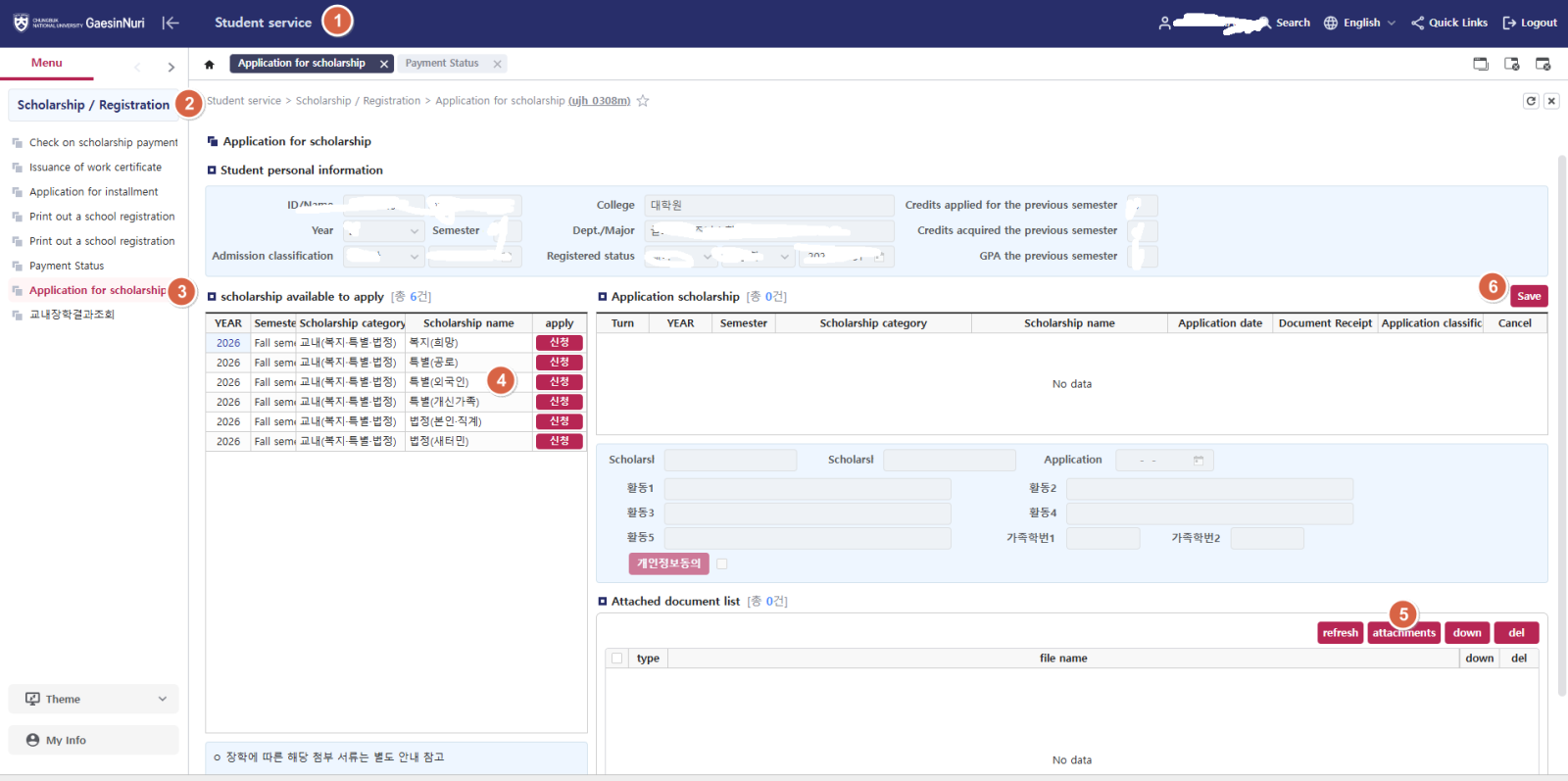
Log in to Gaesinnuri (개신누리):
https://eis.cbnu.ac.kr/cbnuLogin
→ Student Services (학생서비스)
→ Scholarships/Registration (장학/등록)
→ Application for scholarship (교내장학신청)
→ Find the relevant scholarship under “scholarship available to apply” and click “Apply” (신청)
→ Click “Attachments” (파일첨부) in the required-document list
→ Find the file you need to upload, such as your TOPIK Level 6 score report., and then click “Save” (저장)
※ You must upload all required documents for the scholarship you are applying for. After completing the application, please make sure to check the application results, including the scholarship name, whether all required documents have been uploaded, and whether the application has been successfully completed.